
Please Choose Your Language
close
Choose Your Site
Global
Social Media


| Quantity: | |
|---|---|
| PDF Export | |


T305-1
SiRON
8517799000
About selection
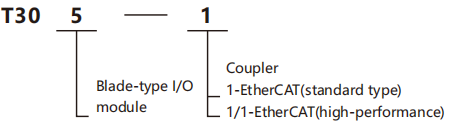
Selection example: T305-1 represents the blade-type I/O module series, and the coupler protocol is EtherCAT(standard type).
Specification
| Bus protoool | EtherCAT |
| Supply voltage | DC24V |
| Supply current | 0.5A |
| Operating temperature | -20~+55℃ |
| Working humidity | 10% to 90%RH,condensation |
| Use ervironment | In situations where there are no corrosive substances, flammable gases, or conductive dust (dust) is not severe |
| Sbrage mperature | -40~+70℃ |
| Altitude | ≤2000m |
| Pollution level | 2 |
| Immunity to interference | power cable 2kV |
| Overvlage class | I |
| EMC ant-interference level | Zone B |
| Vibration resistance | 5-8.4Hz,3.5mm,8.4-150Hz,1g,X/Y/Z three axes,10 cycles per axis |
| Impact resistance | 150m/s 2,11ms,±XN/Z six directions,3 times per direction,for a total of 18 times |
| Class of protection | IP20 |
| Dimension | 75.5×110×22mm |
| Weight | ≈100g |
Dimensions
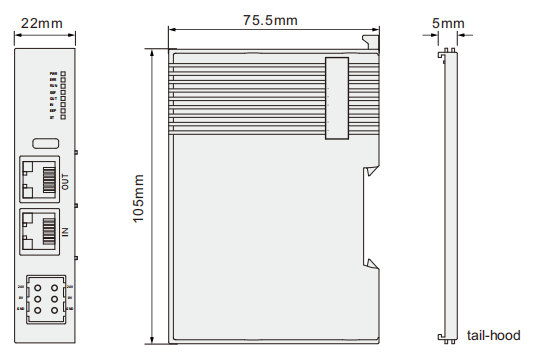
Status indicator description
| Name | Description | Instructions |
| PWR | power light | The DC24V power connection usually shows a green light |
| ERR | Error indicator light | When disconnected, it flashes alternately with the RUN light It lights up when a normal connection is established and does not light up when there is no connection. When disconnected, the ERR light flashes alternately |
| RUN | running indicator light | It turns off normally and lights up during the startup process |
| SSF | System startup completion indicator light | At the OUT position, the green light remains constantly on when the network port hardware connection is normal, and it flashes rapidly during normal communication |
| OUT | Network port OUT indicator light | At the "IN" position, the green light remains constantly on when the network port hardware connection is successful, and it flashes rapidly during normal communication |
| IN | Network port IN indicator light | It lights up normally and turns off during the loading process |
| EEP | System program loading indicator light | When an expansion module is detected, it flashes rapidly; when no module is detected or the communication is abnormal, it flashes slowly |
| ST | Backplane bus detection indicator light | when no module is detected or the communication is abnormal, it flashes slowly |


